
Managing thousands of video clips, photos, audio files, and project assets can quickly become overwhelming. As media libraries continue to grow, finding the right file at the right time becomes increasingly challenging. This is where Mync comes in.
Mync is a powerful media management software designed to help content creators, video editors, photographers, broadcasters, and production teams organize, search, preview, and manage their digital assets efficiently. Whether you’re working independently or handling large production libraries, Mync simplifies asset management and improves productivity.
What Is Mync?
Mync is a dedicated media asset management application developed to organize and manage video, audio, image, and project files from a single interface.
Unlike traditional file explorers, Mync is specifically built for creative professionals who work with large volumes of media content daily.
With intelligent organization tools, metadata support, preview capabilities, and seamless integration with EDIUS, Mync helps users locate and manage assets quickly and efficiently.
Why Media Asset Management Is Important
As projects grow, editors often face challenges such as:
- Lost media files
- Duplicate footage
- Slow file searches
- Poor project organization
- Wasted production time
A proper media management solution helps eliminate these issues while improving workflow efficiency.
Mync is designed specifically to solve these problems.
Key Features of Mync
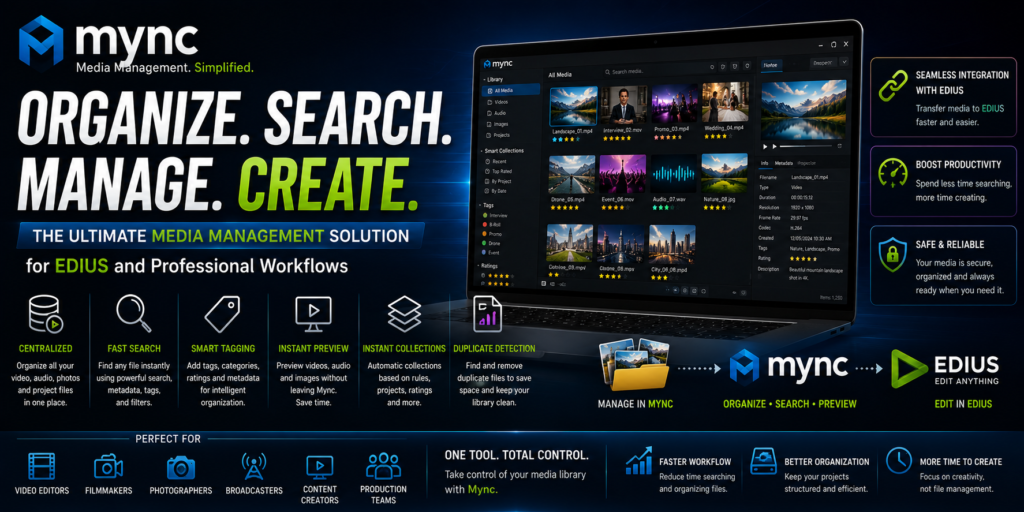
Centralized Media Management
Mync allows users to organize all their media assets from one location.
Supported media types include:
- Video files
- Audio files
- Photos
- Graphics
- Project assets
This centralization makes it easier to locate and manage content.
Fast Media Search
One of Mync’s strongest features is its powerful search functionality.
Users can quickly find files using:
- File names
- Keywords
- Metadata
- Ratings
- Tags
- Categories
This dramatically reduces the time spent searching through folders.
Advanced Metadata Management
Metadata is essential for organizing large media libraries.
Mync allows users to:
- Add custom tags
- Create categories
- Assign ratings
- Edit metadata
- Organize content intelligently
This makes asset retrieval significantly faster.
Instant Media Preview
Editors can preview files directly within Mync without opening additional applications.
Preview support includes:
- Video playback
- Audio playback
- Image viewing
Quick previews save time and improve workflow efficiency.
Smart Collections
Smart Collections automatically group media based on specific criteria.
Examples include:
- Recent imports
- Highly rated clips
- Specific project assets
- Tagged content
These collections update automatically as your library grows.
Duplicate File Detection
Duplicate media can consume valuable storage space and create confusion.
Mync helps identify duplicate assets and maintain a cleaner media library.
Integration with EDIUS
One of the biggest advantages of Mync is its seamless integration with EDIUS.
Editors can:
- Browse media quickly
- Transfer assets efficiently
- Organize footage before editing
- Improve project preparation
This creates a smoother editing workflow from asset management to final production.
Benefits of Using Mync
Faster Workflow
Quick access to organized media allows editors to spend more time creating and less time searching.
Improved Organization
A structured media library helps reduce confusion and maintain consistency across projects.
Better Productivity
Efficient asset management reduces delays and speeds up project completion.
Reduced Storage Waste
Duplicate detection helps optimize storage utilization.
Enhanced Collaboration
Well-organized media libraries make it easier for teams to work together effectively.
How Mync Improves Video Editing Workflows
Video editing projects often involve hundreds or thousands of media files.
Without proper organization:
- Files become difficult to locate
- Projects become harder to manage
- Editing efficiency decreases
Mync addresses these challenges by providing a streamlined workflow for asset organization and retrieval.
Editors can quickly identify the exact clips they need and import them into EDIUS without unnecessary delays.
Organizing Media with Tags and Metadata
One of the most effective ways to manage large media libraries is through tagging.
Examples of useful tags include:
- Wedding
- Corporate
- Drone Footage
- Interview
- B-Roll
- Social Media
Combined with metadata, tags make searching for specific content extremely efficient.
Who Should Use Mync?
Video Editors
- Organize footage efficiently
- Manage large projects
- Speed up editing workflows
YouTube Creators
- Maintain content libraries
- Locate assets quickly
- Improve production efficiency
Wedding Filmmakers
- Manage multiple client projects
- Organize footage by event
- Simplify file management
Broadcasters
- Handle large media archives
- Improve newsroom workflows
- Accelerate content retrieval
Corporate Media Teams
- Manage marketing assets
- Organize training videos
- Maintain consistent workflows
Mync for Large Media Libraries
As media collections grow into thousands of files, traditional folder structures become increasingly difficult to manage.
Mync provides:
- Database-driven organization
- Fast indexing
- Intelligent search
- Metadata-based retrieval
This makes it ideal for professionals handling large-scale content libraries.
Tips for Getting the Most from Mync
Create a Consistent Tagging System
Develop a standardized tagging structure to keep media organized.
Add Metadata During Import
Adding information early improves future searchability.
Use Ratings
Assign ratings to identify your best footage quickly.
Organize by Project
Create project-specific categories for easier management.
Regularly Remove Duplicates
Maintain an efficient library by eliminating unnecessary files.
Common Use Cases
Mync is frequently used for:
- Video production
- Wedding filmmaking
- Corporate content creation
- News production
- Documentary filmmaking
- Social media management
- Digital asset archiving
Its flexibility makes it suitable for a wide variety of creative workflows.
Why Mync Is Better Than Traditional File Management
Standard operating system file explorers were not designed for professional media management.
Mync offers:
- Media previews
- Metadata management
- Advanced search tools
- Smart collections
- Duplicate detection
- Creative workflow optimization
These features make it significantly more powerful for content creators and video professionals.
Final Thoughts
Mync is a powerful media asset management solution that helps creative professionals organize, search, preview, and manage their media libraries more efficiently. With advanced metadata tools, intelligent search capabilities, duplicate detection, and seamless integration with EDIUS, Mync improves productivity and simplifies content management for editors, broadcasters, filmmakers, and content creators.
Whether you’re managing a few hundred files or an extensive media archive, Mync provides the tools needed to maintain an organized and efficient workflow.