
<!– Suggested SEO Title (keyphrase moved to the front): –> <!– Media Asset Management Made Easy: A Complete Guide to Mync –> <!– Suggested Meta Description: –> <!– Discover how Mync, a powerful media asset management tool, helps editors organize, search, and preview thousands of video, photo, and audio files with ease. –>
Media Asset Management Made Easy: A Complete Guide to Mync
Managing thousands of video clips, photos, audio files, and project assets can quickly become overwhelming. As media libraries continue to grow, effective media asset management becomes essential for finding the right file at the right time. Fortunately, Mync provides a smart and efficient solution.
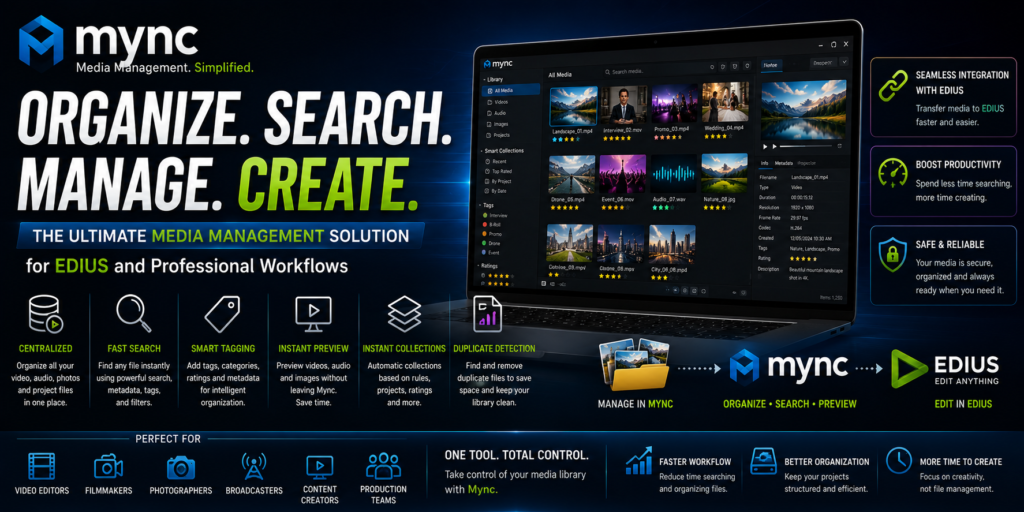
Mync is a powerful media management software designed to help content creators, video editors, photographers, broadcasters, and production teams organize, search, preview, and manage digital assets efficiently. Whether you’re working independently or managing large production libraries, Mync simplifies media organization and significantly improves productivity. <!– [Image suggestion: screenshot of the Mync dashboard] alt=”media asset management dashboard in Mync” –>
What Is Mync? A Media Asset Management Overview
Mync is a dedicated media asset management application built to organize video, audio, image, and project files from a single interface.
Unlike traditional file explorers, Mync is specifically designed for creative professionals who work with large volumes of digital content every day. Furthermore, it offers intelligent organization tools, metadata management, media previews, and seamless integration with EDIUS. As a result, users can locate and manage files much faster. <!– Internal link suggestion: link “EDIUS” to your EDIUS product/landing page –>
Why Media Asset Management Matters
As creative projects grow, managing digital assets becomes increasingly difficult. Without a proper system, editors often encounter several challenges, including:
- Lost media files
- Duplicate footage
- Slow file searches
- Poor project organization
- Wasted production time
However, a professional media asset management solution helps eliminate these problems. Instead of spending valuable time searching through folders, editors can quickly locate the files they need. Consequently, projects become more organized and efficient.
Key Features of Mync’s Media Asset Management Tools
Centralized Media Management
One of Mync’s biggest strengths is its centralized media library. Instead of storing assets across multiple folders, users can organize everything from one convenient interface.
Supported media types include:
- Video files
- Audio files
- Photos
- Graphics
- Project assets
Therefore, managing large media collections becomes much simpler.
Fast and Intelligent Media Search
Searching through thousands of files manually can be frustrating. Fortunately, Mync includes an advanced search engine that helps users locate media within seconds.
You can search using:
- File names
- Keywords
- Metadata
- Ratings
- Tags
- Categories
As a result, editors spend less time searching and more time creating content.
Advanced Metadata Management
Metadata plays a vital role in organizing large media libraries. For this reason, Mync provides powerful metadata management tools.
Users can:
- Add custom tags
- Create categories
- Assign ratings
- Edit metadata
- Organize content intelligently
Furthermore, accurate metadata makes future searches much faster and more reliable. <!– [Image suggestion: metadata tagging panel] alt=”metadata tools for media asset management in Mync” –>
Instant Media Preview
Previewing media before importing it into a project saves valuable time.
With Mync, users can instantly preview:
- Video clips
- Audio files
- Images
Because previews are available directly inside the application, editors no longer need to open multiple programs. Consequently, workflow efficiency improves significantly.
Smart Collections
Another powerful feature is Smart Collections.
Instead of organizing files manually, Smart Collections automatically group media based on selected criteria.
For example, collections can include:
- Recently imported files
- Highly rated clips
- Tagged content
- Project-specific assets
Moreover, these collections update automatically whenever new media is added.
Duplicate File Detection
Duplicate media files consume storage space and create unnecessary confusion.
Fortunately, Mync can identify duplicate assets quickly. As a result, users can remove redundant files and maintain a cleaner, more organized media library.
Seamless Integration with EDIUS
One of Mync’s greatest advantages is its seamless integration with EDIUS.
Editors can:
- Browse media faster
- Transfer assets efficiently
- Organize footage before editing
- Prepare projects more effectively
Consequently, the transition from media management to video editing becomes much smoother. <!– Internal link suggestion: link this section to a related EDIUS workflow/tutorial post –>
Benefits of Using Mync for Media Asset Management
Faster Editing Workflow Because media is organized and searchable, editors spend less time locating files. Therefore, they can focus more on creative editing.
Better Organization A structured media library reduces confusion and keeps projects consistent. Additionally, organized assets are much easier to manage over time.
Increased Productivity Efficient asset management eliminates unnecessary delays. As a result, projects are completed faster and with fewer interruptions.
Reduced Storage Waste Duplicate detection helps optimize storage usage. Furthermore, cleaner libraries improve overall system performance.
Improved Team Collaboration Well-organized media libraries make collaboration much easier. Consequently, production teams can share assets and work together more efficiently.
How Mync Improves Video Editing Workflows
Video editing projects often contain hundreds or even thousands of media files.
Without proper organization:
- Files become difficult to locate.
- Projects become harder to manage.
- Editing efficiency decreases.
However, Mync solves these challenges by providing fast indexing, intelligent search, metadata management, and organized collections. Therefore, editors can quickly identify the exact clips they need and import them directly into EDIUS.
Organizing Media with Tags and Metadata
Tags and metadata are essential for managing large content libraries.
For example, useful tags include:
- Wedding
- Corporate
- Drone Footage
- Interview
- B-Roll
- Social Media
In addition, combining tags with metadata makes searching for specific assets extremely fast, even within libraries containing thousands of files.
Who Should Use Mync for Media Asset Management?
Video Editors Video editors can organize footage more efficiently, manage larger projects, and speed up post-production workflows.
YouTube Creators Content creators can maintain organized media libraries, locate assets quickly, and improve production efficiency.
Wedding Filmmakers Wedding professionals can organize footage by client, event, or ceremony. As a result, project management becomes much easier.
Broadcasters Broadcasters can manage extensive media archives, improve newsroom workflows, and retrieve content faster.
Corporate Media Teams Corporate teams can organize marketing assets, training videos, promotional content, and internal media more effectively.
Mync for Large Media Libraries
As media collections continue to grow, traditional folder structures become increasingly difficult to manage.
Fortunately, Mync provides:
- Database-driven organization
- Fast indexing
- Intelligent search
- Metadata-based retrieval
Therefore, it is an excellent solution for professionals working with large-scale media libraries.
Tips for Getting the Most from Mync
To maximize Mync’s capabilities, consider the following best practices:
- Create a consistent tagging system.
- Add metadata during media import.
- Use ratings to identify your best footage.
- Organize assets by project.
- Regularly remove duplicate files.
Following these practices will help keep your media library organized, searchable, and efficient.
Common Use Cases for Mync
Mync is widely used across various creative industries, including:
- Video production
- Wedding filmmaking
- Corporate content creation
- News production
- Documentary filmmaking
- Social media management
- Digital asset archiving
Because of its flexibility, Mync adapts to virtually any professional media workflow.
Why Mync Is Better Than Traditional File Management
Traditional operating system file explorers were never designed for professional media workflows.
In contrast, Mync offers:
- Instant media previews
- Advanced metadata management
- Intelligent search
- Smart Collections
- Duplicate file detection
- Optimized creative workflows
Therefore, it provides a far more efficient solution for content creators, filmmakers, broadcasters, and professional video editors. <!– Outbound link suggestion: cite an authoritative external source on media asset management best practices, e.g. a well-known industry publication (add the specific URL you want to reference) –>
Final Thoughts on Mync and Media Asset Management
Mync is a powerful media asset management solution that helps creative professionals organize, search, preview, and manage digital assets more efficiently. Moreover, its advanced metadata tools, intelligent search capabilities, Smart Collections, duplicate detection, and seamless EDIUS integration significantly improve productivity.
Whether you’re managing hundreds of files or maintaining an archive containing thousands of media assets, Mync provides the tools needed to build a fast, organized, and professional workflow. Ultimately, investing time in proper media asset management allows you to spend less time searching for files and more time creating outstanding content. <!– Internal link suggestion: link to a related “Getting Started with EDIUS” or “Mync pricing/features” page here –>