
Introduction
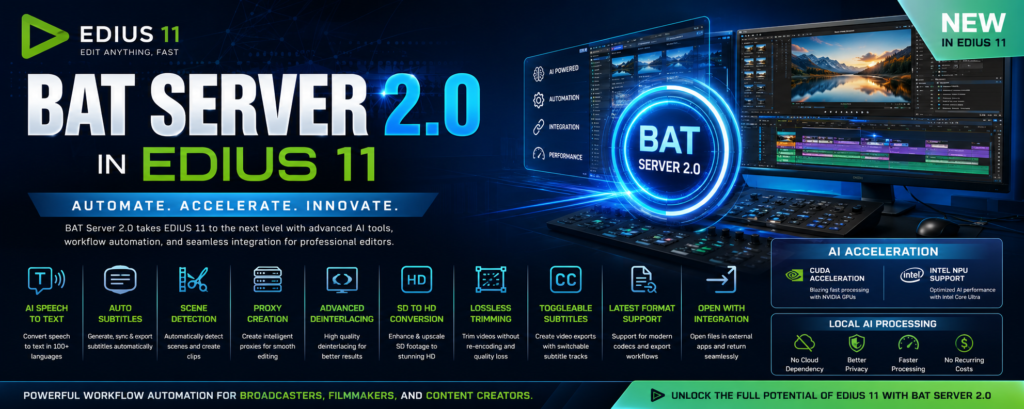
BAT Server 2.0 is one of the most powerful additions to EDIUS 11, designed to automate workflows, integrate AI tools, and extend EDIUS beyond traditional video editing. Developed by EDIUS.NET and Magic Multi Media, BAT Server acts as a bridge between EDIUS and external applications, allowing editors to build custom workflows, automate repetitive tasks, and use local AI processing directly within their editing environment. As a result, video editors, broadcasters, filmmakers, and production houses can complete projects more efficiently while significantly reducing manual work. Moreover, the platform improves productivity by connecting multiple editing tools into one streamlined workflow.
If you’re new to the platform, see our EDIUS 11 overview and review for background before diving into BAT Server 2.0 specifically.
What Is BAT Server 2.0?
BAT Server 2.0 is a workflow automation platform built specifically for EDIUS 11. Instead of functioning like a traditional plugin, it acts as an intelligent workflow engine that automates complex editing operations. For example, it can connect EDIUS with external software, execute AI-powered tasks, create customized workflow extensions, and improve media processing speed automatically. Consequently, editors spend less time performing repetitive operations and more time focusing on creative work. Furthermore, organizations can develop personalized editing solutions that match their production requirements.
Key Features of BAT Server 2.0
1. Open With Integration
One of the most practical features of BAT Server 2.0 is Open With Integration. With this feature, editors can open audio files directly in professional audio software, send graphics to design applications, process media with AI tools, and return edited assets to EDIUS automatically. As a result, there is no need to export and import files repeatedly. Furthermore, this seamless integration reduces manual file management while making the overall workflow much faster and more efficient.
2. AI-Powered Speech-to-Text
Another major feature is the built-in AI-powered Speech-to-Text engine. Using advanced speech recognition technology, BAT Server automatically converts spoken dialogue into editable text. In addition, it can generate subtitles, support nearly 100 languages, and even translate subtitles into English. Therefore, YouTube creators, broadcasters, documentary filmmakers, and corporate production teams can produce accessible content much more quickly. Not only does this save hours of manual transcription, but it also improves productivity across large editing projects.
3. Automatic Subtitle Creation
Creating subtitles manually is often one of the most time-consuming stages of post-production. Fortunately, BAT Server 2.0 automates the entire process by detecting speech, generating subtitle text, synchronizing captions with the timeline, and exporting subtitle files. Consequently, editors can complete subtitle creation in minutes rather than hours. Moreover, this feature improves accessibility while making videos suitable for international audiences.
4. Scene Detection
Scene Detection is another powerful productivity tool. Instead of reviewing long recordings manually, BAT Server automatically identifies scene changes and separates footage into individual clips. For example, it can analyze a two-hour seminar, a television recording, or an entire wedding ceremony within minutes. As a result, editors can navigate footage more efficiently and begin editing much sooner. Additionally, better organization makes managing large projects considerably easier.
5. Intelligent Proxy Creation
Working with 4K, 6K, or even 8K footage can place heavy demands on computer hardware. To solve this problem, BAT Server automatically generates lightweight proxy files that make timeline playback much smoother. Meanwhile, the original high-quality footage remains untouched. Consequently, editors enjoy faster editing performance without sacrificing final output quality.
6. Advanced Deinterlacing
Although progressive video formats dominate modern production, many broadcasters still work with interlaced footage. Therefore, BAT Server includes high-quality deinterlacing tools that improve motion quality and produce cleaner frame conversion. As a result, older broadcast archives and legacy camera footage appear much sharper on today’s displays.
7. SD to HD Conversion
Many organizations continue to maintain extensive Standard Definition video archives. Fortunately, BAT Server includes advanced SD-to-HD upscaling technology that enhances image quality while producing cleaner output for modern platforms. Consequently, archive restoration projects become much easier, and historical footage can be repurposed for today’s HD and 4K workflows.
8. Lossless Video Trimming
Large recordings often contain unnecessary sections that editors need to remove before starting a project. Instead of re-encoding entire files, BAT Server performs lossless trimming while preserving the original quality. As a result, processing is much faster, storage requirements are reduced, and valuable production time is saved. This feature is particularly useful for surveillance recordings, conferences, seminars, and long-form events.
9. Toggleable Subtitle Video Exports
BAT Server also simplifies multilingual content delivery. For example, editors can create videos with embedded subtitle tracks, switchable subtitles, or support for multiple languages. Therefore, educational institutions, OTT platforms, and international content creators can distribute videos to broader audiences more efficiently.
10. Latest Format Export Support
Finally, BAT Server expands EDIUS export capabilities by supporting modern codecs, enhanced file compatibility, and automated export workflows. Consequently, editors can deliver projects more quickly while ensuring compatibility with today’s broadcasting, streaming, and online distribution platforms.
BAT Server 2.0 AI Acceleration Features
BAT Server 2.0 fully supports modern hardware acceleration technologies. For instance, NVIDIA users benefit from CUDA acceleration, which speeds up AI processing, rendering, and workflow automation. Likewise, Intel Core Ultra processors can take advantage of the integrated NPU to perform AI operations more efficiently while reducing CPU usage. As a result, demanding AI tasks finish much faster than traditional CPU-only processing.
BAT Server 2.0 Custom Workflow Automation
One of BAT Server’s greatest strengths is its flexibility. Rather than limiting users to predefined functions, it allows organizations to build custom applications for quality control, metadata management, AI workflows, file processing, export automation, and broadcast operations. Furthermore, companies can develop their own internal tools that integrate seamlessly with existing production pipelines. Therefore, BAT Server adapts easily to workflows of any size.
Local AI Processing in BAT Server 2.0
Another significant advantage is local AI processing. Unlike cloud-based AI services, BAT Server performs processing directly on your own computer. Consequently, there is no dependency on internet connectivity, recurring subscription costs, or external servers. More importantly, sensitive footage remains within the organization, making this feature particularly valuable for broadcasters, government agencies, police departments, and corporate environments where data privacy is essential.
Installing BAT Server 2.0
Installing BAT Server 2.0 is a straightforward process. First, install EDIUS 11 on your computer. Next, open the EDIUS.NET Setup Manager and download BAT Server V2. After that, complete the installation and restart EDIUS. Once the application launches again, all BAT Server functions become available directly inside EDIUS. Therefore, editors can begin using workflow automation immediately.
See our step-by-step EDIUS plugin installation guide if you run into any setup issues.
Who Should Use BAT Server 2.0?
BAT Server 2.0 is suitable for a wide range of creative professionals. For example, YouTube creators can generate subtitles automatically and accelerate exports. Similarly, wedding editors can organize footage using Scene Detection while benefiting from proxy workflows. Meanwhile, broadcasters can improve quality control and batch processing, whereas filmmakers can streamline AI transcription and workflow customization. In addition, production houses can automate repetitive tasks across multiple users, significantly reducing production costs.
Conclusion
BAT Server 2.0 transforms EDIUS 11 from a traditional non-linear editor into a powerful, AI-driven production platform. Not only does it automate repetitive editing tasks, but it also introduces advanced AI capabilities, hardware acceleration, and extensive workflow customization. Moreover, features such as Speech-to-Text, Scene Detection, proxy creation, Open With Integration, local AI processing, and CUDA or Intel NPU acceleration enable editors to work faster without sacrificing quality. Ultimately, BAT Server 2.0 is one of the most valuable productivity enhancements available for EDIUS 11 users. Best of all, these powerful features are available at no additional cost and can be installed directly through the EDIUS.NET Setup Manager.