
Professional photo editing often requires hours of retouching, masking, and background editing. However, AI Retouching in Delux Editor Pro can make these tasks much faster and easier. Instead of spending excessive time on repetitive edits, photographers and album designers can improve portraits, remove unwanted backgrounds, and prepare images for professional album layouts.
Moreover, combining AI-powered editing with Delux Editor Pro’s album design tools helps create polished results while keeping the workflow simple.
What Is AI Retouching?
AI Retouching uses intelligent editing technology to help improve photographs with less manual work. For example, it can assist with cleaning up portraits, enhancing important details, and preparing images for creative compositions.
For wedding photographers, this can be especially useful because large projects often contain hundreds of photographs.
Key Benefits
- Faster portrait enhancement
- Cleaner images
- Reduced manual editing
- Easier background removal
- Better subject isolation
- More consistent results
- Faster album production
Therefore, AI-based tools can help designers spend more time on creativity and less time on repetitive tasks.
AI Retouching in Delux Editor Pro
Delux Editor Pro brings powerful editing capabilities into a workflow designed for album designers. With its AI-focused tools, you can prepare photographs before placing them into album layouts.
Instead of manually processing every image separately, you can streamline common editing tasks and move more quickly toward the final album.
How to Use AI Retouching
Getting started is simple.
Step 1: Import Your Photos
First, open your project in Delux Editor Pro and import the photographs you want to edit.
For wedding albums, select the best portraits and important moments first. This helps keep your project organized.
Step 2: Select the Photo
Choose the photograph that needs enhancement. Ideally, use a high-resolution image with good lighting because better source images generally produce better editing results.
Step 3: Open the AI Editing Tools
Next, open the available AI editing options in Delux Editor Pro.
Depending on the editing requirement, select the appropriate retouching or background tool.
Step 4: Apply AI Retouching
Apply the required enhancement and review the result carefully.
If necessary, adjust the result manually. This is important because AI tools should support your creative decisions rather than completely replace them.
Step 5: Save the Edited Image
Once the image looks correct, save the edited version and continue working on your album.
Master Background Removal
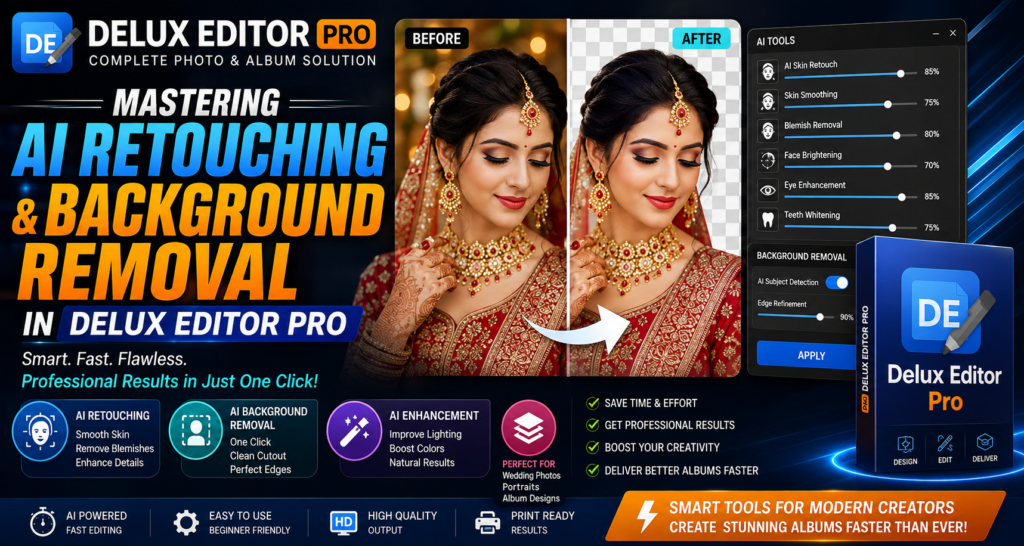
Background removal is another useful technique for professional album design. Removing a distracting background allows you to isolate the main subject and place it into a more creative composition.
For example, you can separate a bride and groom from the original background and place them over a decorative wedding design.
Why Background Removal Matters
A clean background can:
- Highlight the main subject
- Create modern album compositions
- Remove unwanted distractions
- Make creative layouts easier
- Improve visual consistency
Furthermore, background removal is useful for creating cover pages, portraits, invitation designs, and promotional graphics.
How to Remove a Background
1. Choose Your Image
Select a photograph where the subject is clearly visible.
2. Open Background Removal
Use the background removal option available in Delux Editor Pro.
3. Let the AI Detect the Subject
The AI tool identifies the primary subject and separates it from the surrounding background.
4. Review the Edges
Always check areas such as:
- Hair
- Clothing
- Jewellery
- Fingers
- Veils
- Fine details
These areas can require additional adjustment.
5. Refine the Result
If required, manually correct the selection to achieve a cleaner result.
6. Place the Subject in Your Design
Finally, use the isolated subject in your album layout or creative composition.
AI Retouching for Wedding Photography
Wedding photography contains many details that benefit from careful editing. Portraits, group photographs, couple shots, and close-up images can all require different adjustments.
With AI Retouching, designers can speed up routine editing before starting the album layout.
For example, a wedding workflow can look like this:
Import Photos → AI Retouching → Background Removal → Album Layout → Manual Editing → Final Export
As a result, the entire process becomes more organized and efficient.
Create Better Wedding Album Layouts
Once your photographs are cleaned and prepared, you can move them into your album layouts.
Delux Editor Pro can help you combine edited photographs with templates and creative compositions. Therefore, you don’t need to treat photo editing and album designing as completely separate processes.
You can prepare the photographs and then immediately use them in your album project.
Tips for Better AI Editing Results
To get better results, follow a few simple practices.
Use High-Quality Photos
Start with sharp, high-resolution photographs whenever possible.
Avoid Extremely Complex Backgrounds
Simple backgrounds usually make subject detection easier.
Check Hair and Fine Details
Always inspect hair, jewellery, clothing edges, and other fine areas after background removal.
Don’t Over-Retouch
Natural-looking photographs usually produce better professional results than excessive smoothing or enhancement.
Review Before Printing
Before exporting your final album, zoom into important photographs and check for unwanted artifacts or editing mistakes.
AI Retouching vs Manual Editing
Manual editing provides complete control, but it can take considerable time. On the other hand, AI tools can automate repetitive tasks and provide a useful starting point.
| Feature | AI Editing | Manual Editing |
|---|---|---|
| Speed | Fast | Slower |
| Repetitive tasks | Excellent | Time-consuming |
| Creative control | High with adjustments | Very high |
| Background removal | Automated assistance | Fully manual |
| Large projects | Efficient | Requires more time |
Therefore, the best workflow often combines both approaches: use AI for speed and manual editing for final control.
Build a Faster Album Design Workflow
A productive album workflow can save hours on large wedding projects.
Try this process:
- Organize photographs.
- Select the best images.
- Apply AI Retouching.
- Remove unwanted backgrounds.
- Review important details.
- Create your album layout.
- Make final creative adjustments.
- Export the finished album.
This approach keeps the editing process structured and reduces unnecessary repetition.
Why Professional Album Designers Can Benefit
Album designers often work with tight deadlines. Consequently, reducing the time spent on repetitive editing can make a significant difference.
With AI Retouching and background removal, designers can prepare more photographs in less time. They can then focus on composition, storytelling, typography, and overall album presentation.
Final Thoughts
AI Retouching and background removal can transform the way photographers approach professional album production. Delux Editor Pro combines these editing capabilities with an album-focused workflow, helping designers prepare photographs and create polished wedding albums more efficiently.
Most importantly, AI should be used as a creative assistant. Review every result, make manual corrections when necessary, and keep the final design natural.