
Introduction
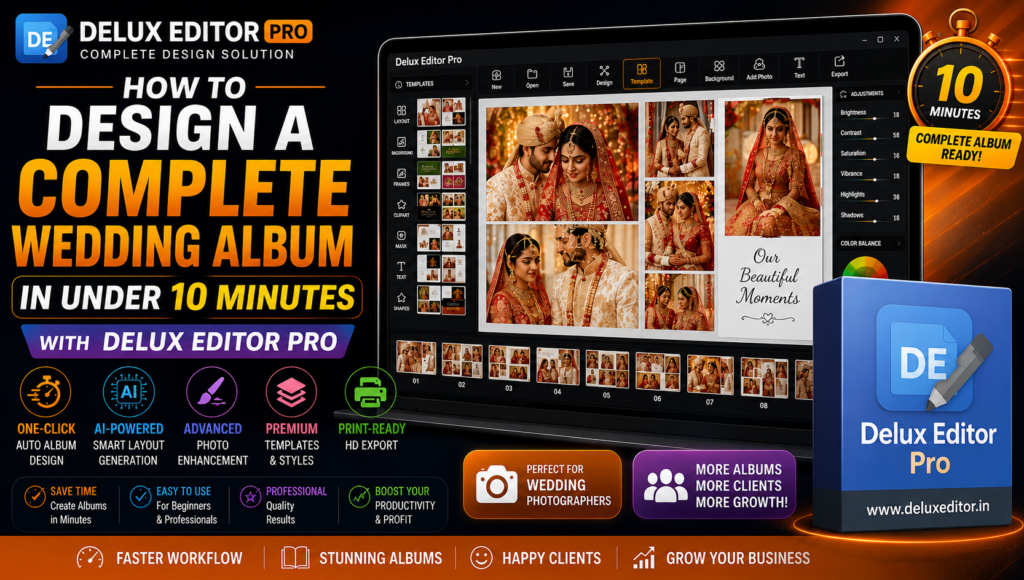
Every wedding photographer wants to deliver beautiful albums quickly without sacrificing quality. Design a Complete Wedding Album with Delux Editor Pro in less than 10 minutes using AI-powered automation, premium templates, and professional editing tools. Moreover, the software simplifies every step of the album creation process, allowing photographers to focus on creativity instead of repetitive design work.
Whether you are a professional album designer or just getting started, Delux Editor Pro helps you create stunning, print-ready wedding albums with ease.
Why Fast Wedding Album Design Matters
Wedding photography projects often include hundreds or even thousands of images. Therefore, manually arranging photos can take several hours or even days. However, Delux Editor Pro automates the entire workflow, enabling photographers to complete albums much faster while maintaining professional quality.
As a result, you can deliver projects on time, increase productivity, and satisfy more clients.
Step 1: Import Wedding Photos
Begin by importing all wedding photographs into Delux Editor Pro.
The software supports high-resolution images and organizes them efficiently. Additionally, it allows you to preview every photo before starting the design process.
Step 2: Choose a Premium Album Template
Next, select one of the professionally designed album templates included with Delux Editor Pro.
These templates are suitable for:
- Wedding albums
- Pre-wedding albums
- Engagement albums
- Reception albums
- Traditional wedding albums
- Modern wedding albums
Furthermore, every template is fully customizable.
Step 3: Use One-Click Auto Album Design
The most powerful feature is the One-Click Auto Album Design tool.
Simply select your photos, choose a template, and let the AI automatically arrange images into elegant layouts.
Consequently, what once required hours can now be completed in just minutes.
Step 4: Customize the Layout
Although the AI creates a professional layout automatically, you can easily customize it.
You can:
- Rearrange photos
- Change backgrounds
- Add frames
- Insert text
- Apply shadows
- Resize images
- Adjust spacing
- Change page layouts
Moreover, every modification updates instantly.
Step 5: Enhance Photos with AI Tools
Delux Editor Pro includes intelligent editing tools that improve photo quality automatically.
Features include:
- AI Photo Enhancement
- Portrait Retouching
- Advanced Color Correction
- Background Editing
- Skin Tone Enhancement
- Noise Reduction
- Sharpness Adjustment
- Smart Cropping
As a result, every image looks polished and professional.
Step 6: Preview the Album
Before exporting, preview every page to ensure the album looks perfect.
Additionally, you can quickly make last-minute adjustments without redesigning the entire project.
Step 7: Export Print-Ready Files
Finally, export the album in high resolution for printing.
Delux Editor Pro supports professional print-ready output with excellent image quality, making it suitable for every major album printing service.
Key Features That Save Time
Delux Editor Pro includes numerous productivity tools.
- One-Click Auto Album Design
- AI-Powered Photo Editing
- Premium PSD Templates
- Smart Layout Generator
- Drag-and-Drop Editing
- Batch Image Processing
- Photoshop Integration
- HD Print Export
- Professional Album Templates
- High-Speed Performance
Therefore, photographers can complete more projects in less time.
Benefits of Using Delux Editor Pro
There are many reasons why photographers prefer Delux Editor Pro.
- Saves hours of manual work
- Easy for beginners
- Professional-quality results
- AI-powered automation
- Faster workflow
- Customizable layouts
- High-resolution export
- Supports all popular album sizes
- Ideal for wedding studios
- Increases productivity
Moreover, the software is designed for photographers who need both speed and quality.
Tips for Designing Better Wedding Albums
For the best results, follow these simple tips:
- Select your best photographs first.
- Keep page layouts clean and balanced.
- Maintain consistent colors throughout the album.
- Avoid overcrowding pages.
- Use high-resolution images.
- Preview every spread before exporting.
- Save custom templates for future projects.
- Export using the recommended print settings.
Consequently, your albums will look more professional and visually appealing.
Who Should Use Delux Editor Pro?
Delux Editor Pro is ideal for:
- Wedding photographers
- Album designers
- Professional photo studios
- Freelance editors
- Event photographers
- Portrait photographers
- Photography businesses
- Beginners learning album design
Whether you create one album each week or several every day, Delux Editor Pro can significantly improve your workflow.
Why Choose Delux Editor Pro?
Unlike traditional album design software, Delux Editor Pro combines AI-powered automation with professional editing features.
Furthermore, its user-friendly interface reduces the learning curve, while advanced customization tools provide complete creative control. Therefore, photographers can create premium wedding albums quickly without compromising quality.
Final Thoughts
If you want to Design a Complete Wedding Album quickly and professionally, Delux Editor Pro is an excellent solution. Its AI-powered automation, premium templates, and intelligent editing tools dramatically reduce design time while producing beautiful, print-ready albums.
Overall, Delux Editor Pro helps photographers save time, increase productivity, and deliver exceptional wedding albums that impress every client.