
Introduction
Designing a wedding album manually can take several hours, especially when arranging hundreds of photographs across multiple pages. Fortunately, modern album design software has made this process much faster and more efficient. One of the most powerful features available today is Auto Album Design in Delux Editor Pro.
Whether you are a beginner, freelance album designer, or professional wedding photographer, Auto Album Design helps you create beautiful, print-ready albums in just a few clicks. Instead of placing every photo manually, the software intelligently organizes your images into attractive layouts, saving both time and effort.
What is Auto Album Design?
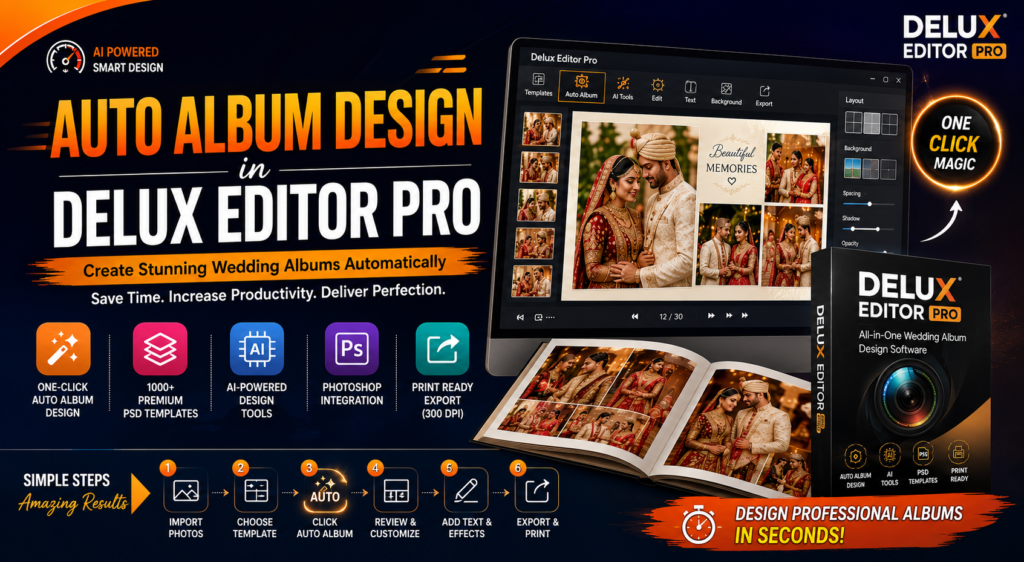
Auto Album Design is a smart feature in Delux Editor Pro that automatically arranges selected photographs into professionally designed album layouts. After importing your images and selecting a template, the software generates a complete album layout within seconds.
Rather than starting from a blank page, you receive a ready-made design that can be customized according to your preferences.
Why Auto Album Design Matters
Wedding photographers often capture thousands of images during a single event. Selecting photos and designing every page manually can become time-consuming, especially when handling multiple client projects.
Auto Album Design simplifies this process by creating balanced and visually appealing layouts automatically. As a result, photographers can deliver albums faster while maintaining professional quality.
Key Features of Auto Album Design
Delux Editor Pro offers several intelligent features that make album creation easier.
One-Click Album Creation
Simply import your wedding photos, choose a preferred album template, and click the Auto Album button. Within moments, the software creates a complete album layout.
Smart Photo Arrangement
The software automatically places photographs in balanced positions while maintaining spacing, alignment, and page composition. This creates elegant layouts without requiring manual adjustments.
Premium Album Templates
Delux Editor Pro includes a large collection of professionally designed PSD templates suitable for weddings, engagements, receptions, baby shoots, and other events.
Easy Customization
Although the album is created automatically, you still have complete control over the design. You can easily resize images, change backgrounds, adjust layouts, add text, or replace photographs whenever needed.
Photoshop Integration
For advanced editing, Delux Editor Pro works seamlessly with Adobe Photoshop. Users can edit images in Photoshop and continue designing their albums without interrupting their workflow.
How to Create an Auto Album in Delux Editor Pro
Creating an album is simple and requires only a few steps.
- Import your wedding photographs.
- Select your favorite album template.
- Click the Auto Album Design option.
- Allow the software to generate the album automatically.
- Review each page and make any desired changes.
- Export the final album in high resolution for printing.
The entire process takes only a fraction of the time compared to traditional manual designing.
Benefits of Auto Album Design
Using Auto Album Design provides several advantages for photographers and album designers.
- Saves hours of manual work
- Creates professional layouts instantly
- Improves productivity
- Reduces repetitive editing
- Maintains consistent page design
- Supports high-resolution print-ready export
- Easy for beginners to learn
- Suitable for high-volume wedding projects
Who Should Use Auto Album Design?
Auto Album Design is ideal for:
- Wedding photographers
- Photo studios
- Freelance album designers
- Professional album makers
- Event photographers
- Beginners learning album design
Whether you design one album each week or hundreds every year, this feature helps increase efficiency while maintaining excellent quality.
Why Choose Delux Editor Pro?
Delux Editor Pro is designed specifically for photographers who need speed, flexibility, and professional results.
Some of its standout features include:
- One-click Auto Album Design
- AI-powered editing tools
- Thousands of premium PSD templates
- Photoshop integration
- Drag-and-drop editing
- Print-ready export at 300 DPI
- Multiple album size support
- User-friendly interface
- Lifetime license
These features make Delux Editor Pro one of the most reliable wedding album design software solutions available today.
Tips for Better Auto Album Designs
Although automation speeds up the process, following a few best practices will improve your final results.
- Select only your best photographs.
- Arrange images in the correct story sequence.
- Use consistent backgrounds throughout the album.
- Avoid overcrowding pages with too many photos.
- Review every page before exporting.
- Keep important moments on larger layouts.
- Use clean and elegant templates for a premium appearance.
Final Thoughts
Auto Album Design in Delux Editor Pro transforms the way photographers create wedding albums. Instead of spending hours arranging photographs manually, you can generate professional layouts within seconds and customize them with ease.
Whether you are just beginning your album design journey or managing a busy photography studio, Delux Editor Pro provides the tools needed to create beautiful, print-ready albums quickly and efficiently.
If you want to save time, improve productivity, and deliver stunning wedding albums to your clients, Auto Album Design in Delux Editor Pro is an excellent solution.