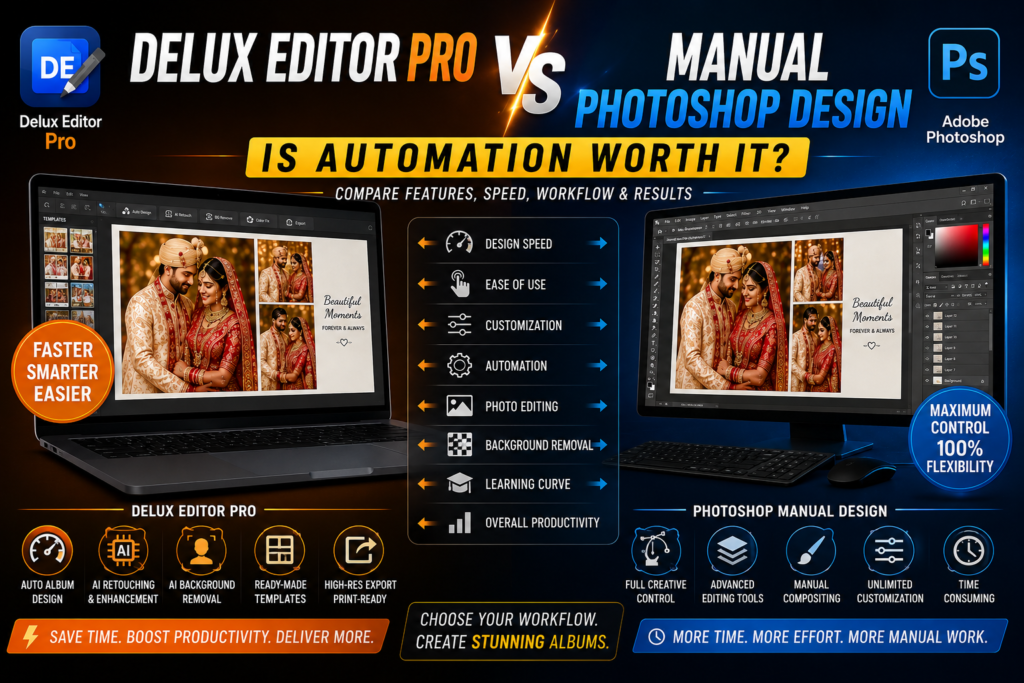

Wedding album design requires both creativity and speed. Delux Editor Pro vs Photoshop is an important comparison for photographers and professional album designers who want to create high-quality albums more efficiently.
Adobe Photoshop offers extensive creative control and advanced editing capabilities. However, designing every album page manually can take considerable time. Delux Editor Pro, on the other hand, focuses on album design, automation, templates, and faster production.
So, is automation really worth it? Let’s find out.
Delux Editor Pro vs Photoshop: What Is the Difference?
The biggest difference is the overall workflow.
Photoshop is a powerful image editing and graphic design application. Designers can create almost any type of composition with enough time and skill. However, many album-design tasks must be completed manually.
Delux Editor Pro is built with album designers in mind. Instead of starting every layout from scratch, designers can use templates, automated tools, and album-focused features.
As a result, Photoshop provides greater manual flexibility, while Delux Editor Pro focuses more strongly on productivity.
1. Album Design Speed
Speed matters when you are producing multiple wedding albums every month.
With Photoshop, a typical workflow may involve importing photographs, creating layouts, resizing images, adjusting spacing, adding backgrounds, and positioning text. Consequently, repeating these steps across dozens of pages can become time-consuming.
Delux Editor Pro is designed to reduce this repetitive work. Using automated album layouts and templates, designers can create a starting point quickly and then customize the result.
Therefore, automation can be particularly useful for professional album studios handling multiple client projects.
2. Manual Control in Photoshop
Photoshop is well known for its extensive editing capabilities.
For instance, designers can work with:
- Layers
- Masks
- Brushes
- Selections
- Adjustment layers
- Blending modes
- Typography
- Filters
- Advanced effects
Because of this flexibility, Photoshop is an excellent choice for highly customized album designs.
If a client requests a completely unique composition, the designer can build the entire layout manually. In addition, advanced compositing and detailed retouching are areas where Photoshop remains extremely powerful.
3. Automation in Delux Editor Pro
Automation becomes especially useful when repetitive tasks are involved.
A wedding album can contain many pages and hundreds of photographs. Instead of manually arranging every image, an automated workflow can provide a structured starting layout.
Delux Editor Pro can help with tasks such as:
- Album layout creation
- Photo arrangement
- Template-based designing
- AI-assisted editing
- Background removal
- Retouching
- Color adjustments
- High-resolution export
As a result, designers can spend less time performing repetitive operations and more time improving the visual quality of the album.
4. Templates and Ready-Made Layouts
Creating every album page from scratch can slow down production.
Photoshop allows designers to create and save their own templates. Nevertheless, the designer still needs to manage those resources and manually build many layouts.
Delux Editor Pro takes a more album-focused approach. Ready-made templates and layouts can provide a useful starting point for wedding projects.
For beginners, this can make album designing easier. Meanwhile, experienced designers can customize the layouts to match their own style.
5. Photo Editing
Both applications can be useful for editing wedding photographs. However, they approach the process differently.
Photoshop provides extensive manual control over individual images. Designers can perform detailed retouching, masking, compositing, color adjustments, and other advanced operations.
Delux Editor Pro, meanwhile, focuses on making common album-production tasks faster. Therefore, it can be convenient when a designer needs to process many photographs before placing them into an album.
For highly detailed editing, Photoshop may still be the preferred option. On the other hand, Delux Editor Pro can provide a faster workflow for everyday album production.
6. Background Removal
Background removal is another area where automation can save valuable time.
In Photoshop, complex selections can require careful manual masking. Hair, jewelry, clothing, and other fine details may need additional attention.
With AI-assisted tools, the initial background removal process can be completed more quickly. Afterward, designers can review the result and make corrections whenever necessary.
Therefore, automation does not have to replace creative control. Instead, it can provide a faster starting point.
7. Color Correction
Consistent color is essential for professional wedding albums.
Photographs may come from different cameras, lighting conditions, and locations. Consequently, exposure, contrast, saturation, and white balance may vary from one photograph to another.
Photoshop provides detailed manual control for these adjustments. Delux Editor Pro can also support faster editing workflows for common album-production requirements.
Ultimately, the right choice depends on how much manual control and speed your project requires.
8. Learning Curve
Photoshop offers a huge range of features. Because of that, beginners may need time to understand layers, masks, selections, adjustment layers, smart objects, and other tools.
Delux Editor Pro can provide a more focused workflow for users whose primary goal is wedding album design.
For this reason, beginners may find an album-focused application easier to approach. Experienced Photoshop users, however, may already have established workflows that allow them to work quickly.
9. Creative Freedom
When maximum creative freedom is the priority, Photoshop has a major advantage.
Designers can create:
- Custom artwork
- Complex photo composites
- Unique typography
- Advanced effects
- Detailed masks
- Custom backgrounds
- Completely original layouts
Delux Editor Pro focuses more heavily on productivity and album creation.
That does not mean automation removes creativity. Instead, automation can handle repetitive operations while the designer concentrates on composition, storytelling, and visual style.
10. Print-Ready Album Production
A professional album workflow should always end with properly prepared files.
Before sending an album to a printing lab, check:
- Final dimensions
- Resolution
- Color settings
- Bleed
- Safe areas
- Image quality
- File format
- Text placement
Both Photoshop and Delux Editor Pro can be used as part of a professional print workflow. However, the printing laboratory’s specifications should always take priority.
Delux Editor Pro vs Photoshop: Quick Comparison
| Feature | Delux Editor Pro | Photoshop |
|---|---|---|
| Wedding album design | Excellent | Excellent |
| Automation | Strong | More manual |
| Album templates | Strong | Requires setup |
| Advanced photo editing | Good | Excellent |
| Advanced compositing | Limited compared with Photoshop | Excellent |
| Background removal | AI-assisted | Manual + automated |
| Creative freedom | High | Extremely high |
| Beginner-friendly workflow | Yes | Requires learning |
| Repetitive album production | Faster | More manual |
| Customization | High | Excellent |
Is Automation Worth It?
For many album designers, automation is worth considering.
Saving a few minutes on one page might not seem significant. However, those minutes can quickly add up when an album contains dozens of pages.
For example, imagine spending several minutes manually arranging each page. A 30-page album could require hours of repetitive layout work.
With automation, that time can instead be used for:
- Creative improvements
- Client revisions
- Photo selection
- Retouching
- New projects
- Marketing
- Business development
Therefore, automation can provide a real productivity advantage for busy album studios.
When Should You Choose Photoshop?
Photoshop may be the better choice when:
- You create highly customized artwork.
- Advanced compositing is important.
- Detailed retouching is required.
- You already have an efficient Photoshop workflow.
- Maximum manual control is necessary.
- Every project has a completely different visual style.
In these situations, Photoshop’s flexibility can be more valuable than automation.
When Should You Choose Delux Editor Pro?
Delux Editor Pro can be a strong choice when:
- Wedding albums are your primary design work.
- You want to reduce repetitive tasks.
- You create multiple albums regularly.
- Templates can speed up your workflow.
- Automation is important to your business.
- You want a focused album-design workflow.
- You are starting professional album designing.
As a result, album studios can potentially complete projects faster while maintaining creative control over the final design.
Can You Use Both?
Yes. In fact, combining both applications can create an efficient workflow.
First, organize and select your wedding photographs. Next, use Delux Editor Pro to create the initial album layouts. After that, customize the pages and make design adjustments.
For advanced image manipulation, Photoshop can then be used where necessary. Finally, review the complete album and export high-resolution files according to your laboratory’s specifications.
This hybrid workflow combines automation with advanced manual editing.
Final Verdict
The choice between Delux Editor Pro vs Photoshop depends on your priorities.
If your main goal is maximum creative control, Photoshop remains an excellent choice. On the other hand, designers who prioritize faster album production may benefit from Delux Editor Pro’s automation-focused workflow.
For many professionals, choosing only one application may not be necessary. Instead, combining automation with advanced editing can provide the best balance between speed and creativity.
In simple terms:
Choose Photoshop for maximum creative flexibility.
Choose Delux Editor Pro for faster album production and automation.
Use both when you want productivity without sacrificing creative control.
Conclusion
Wedding album design requires a balance between creativity, quality, and productivity. Although Photoshop provides exceptional control, manually creating every album page can take significant time.
Delux Editor Pro approaches the process differently by focusing on album production, templates, and automation. Consequently, it can help designers reduce repetitive work and focus more on creating beautiful album experiences.
Ultimately, the best workflow depends on your projects, experience, and business needs. When speed matters, automation can be a valuable advantage. When complete creative control matters most, Photoshop remains a powerful choice.