
Introduction
Virtual Studio Technology (VST) plugins have become an essential part of modern audio production. Whether you’re editing videos, producing music, recording podcasts, restoring audio, or mixing soundtracks, plugins help you achieve professional-quality results. Moreover, they allow you to expand the functionality of your editing software with advanced audio effects and virtual instruments.
Among the most popular plugin formats are VST2 and VST3. Although both formats serve the same purpose, they differ in performance, CPU efficiency, compatibility, automation, and workflow. Therefore, understanding these differences is essential before choosing the right plugin format.
In this comprehensive guide, you’ll learn how VST2 and VST3 compare, their advantages and disadvantages, and which plugin format is the best choice for your workflow in 2026.
What Is VST?
VST (Virtual Studio Technology) is a plugin standard developed by Steinberg that allows audio editing software to use third-party effects and virtual instruments. As a result, editors, musicians, podcasters, and content creators can significantly improve their audio quality without purchasing additional hardware.
Common VST plugins include:
- Equalizers (EQ)
- Compressors
- Noise Reduction
- Reverb
- Delay
- Pitch Correction
- Virtual Instruments
- Audio Restoration Tools
Furthermore, VST plugins are supported by most modern Digital Audio Workstations (DAWs) and several professional video editing applications.
What Is VST2?
VST2 was introduced by Steinberg in 1999 and quickly became the industry standard for audio plugins. Since then, thousands of developers have created professional effects and virtual instruments using the VST2 format.
Because of its excellent compatibility, VST2 remains widely used even today. However, Steinberg has officially discontinued VST2 licensing for new plugin development.
Key Features of VST2
- Excellent compatibility
- Stable performance
- Large plugin library
- Supports effects and instruments
- Easy installation
- Reliable workflow
Consequently, many legacy applications still rely heavily on VST2 plugins.
What Is VST3?
VST3 is the latest generation of Steinberg’s plugin format. Unlike VST2, it was designed to improve efficiency, flexibility, and performance for modern production environments.
Additionally, VST3 introduces several advanced technologies that help reduce CPU usage and improve workflow.
Key Features of VST3
- Better CPU optimization
- Dynamic input and output routing
- Sample-accurate automation
- Automatic silence processing
- Advanced MIDI support
- Native sidechain support
- Modern plugin architecture
Therefore, most newly released plugins are now developed primarily in the VST3 format.
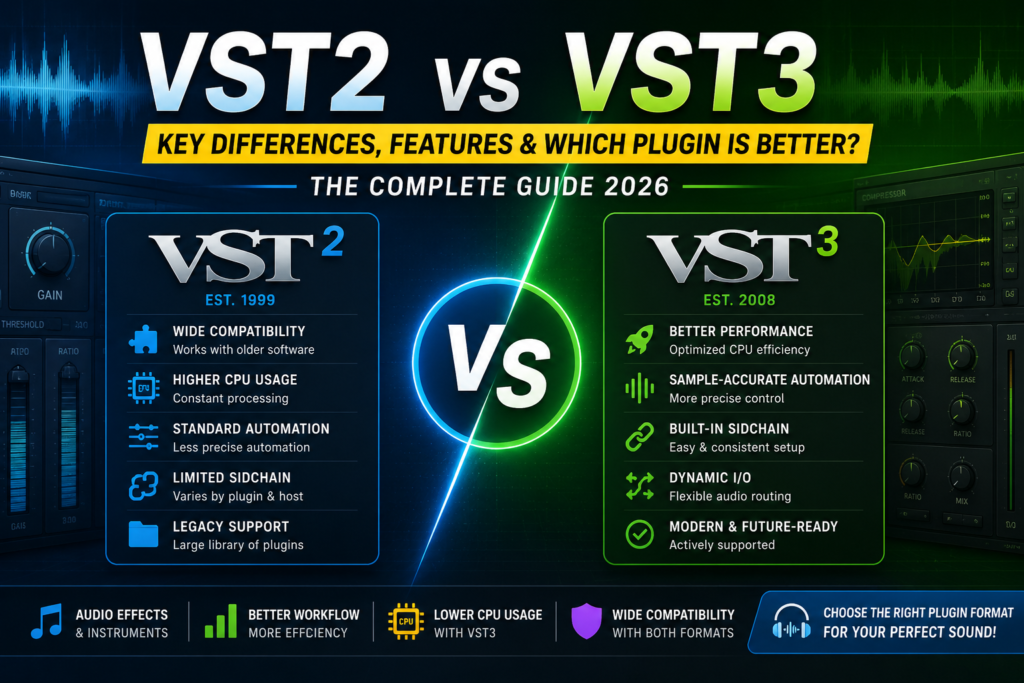
VST2 vs VST3 Feature Comparison
| Feature | VST2 | VST3 |
|---|---|---|
| Release Year | 1999 | 2008 |
| CPU Efficiency | Good | Excellent |
| Automation | Standard | Sample Accurate |
| Sidechain | Limited | Built-in |
| MIDI Support | Basic | Advanced |
| Dynamic Routing | No | Yes |
| Silence Processing | No | Yes |
| Future Support | Discontinued | Active |
| Compatibility | Excellent | Excellent |
Performance Comparison
Performance is one of the biggest differences between these two plugin formats.
VST2 processes audio continuously, regardless of whether audio is passing through the plugin. Consequently, it consumes more CPU resources during large projects.
In contrast, VST3 processes audio only when necessary. As a result, it significantly reduces CPU usage and improves system performance.
Furthermore, editors working on complex projects with multiple audio tracks often notice smoother playback and faster rendering when using VST3 plugins.
CPU Usage
CPU efficiency is especially important for professional editors working on large timelines.
VST2
- Constant processing
- Higher CPU usage
- Suitable for older software
VST3
- Smart processing
- Lower CPU usage
- Better memory management
- Improved efficiency
Therefore, VST3 is generally recommended for modern computers and high-resolution editing projects.
Automation
Automation allows users to change plugin settings over time.
VST2 supports traditional automation. However, VST3 introduces sample-accurate automation, allowing smoother and more precise parameter changes.
Consequently, effects such as volume fades, filter sweeps, and delay automation become much more accurate.
Sidechain Support
Sidechain processing is widely used in music production and professional broadcasting.
With VST2, sidechain functionality depends on both the host application and the plugin itself.
On the other hand, VST3 includes native sidechain support. Therefore, configuring compressors, gates, and ducking effects becomes much simpler.
Audio Routing
Modern production workflows often require flexible routing.
VST2 uses fixed input and output channels.
Meanwhile, VST3 supports dynamic routing that automatically adapts to different project requirements.
As a result, complex audio sessions become easier to manage.
Compatibility
Compatibility remains one of VST2’s strongest advantages.
Because it has existed for decades, thousands of applications still support VST2 plugins.
However, modern software developers increasingly prioritize VST3 due to its improved architecture and future support.
Therefore, new users should generally choose VST3 whenever possible.
Which Plugin Format Is Better for EDIUS?
If you use EDIUS 11, VST3 plugins are generally the better choice.
In addition, they offer:
- Better performance
- Lower CPU usage
- Improved stability
- Better compatibility with modern plugins
- Future-proof support
Nevertheless, VST2 remains useful when older plugins are required.
Advantages of VST2
- Excellent compatibility
- Huge plugin library
- Stable performance
- Supports legacy software
- Easy installation
Advantages of VST3
- Better CPU optimization
- Sample-accurate automation
- Dynamic routing
- Native sidechain support
- Modern architecture
- Future compatibility
Disadvantages of VST2
- Higher CPU usage
- Limited sidechain functionality
- Older architecture
- No future development
Disadvantages of VST3
- Older software may not support it
- Some legacy projects require VST2
- A few older plugins are unavailable
Which One Should You Choose?
Choose VST2 if you:
- Use older editing software
- Need legacy plugin compatibility
- Maintain older production projects
Choose VST3 if you:
- Use modern editing software
- Want lower CPU usage
- Need advanced automation
- Use sidechain effects
- Work with professional workflows
- Want long-term compatibility
Final Verdict
Both VST2 and VST3 are excellent plugin formats that have played a significant role in professional audio production. However, VST3 offers several improvements that make it the preferred choice for most users today.
In particular, its lower CPU usage, sample-accurate automation, dynamic routing, native sidechain support, and modern architecture provide a faster and more efficient editing experience. Furthermore, because Steinberg actively supports VST3, it continues to receive updates and improvements for modern workflows.
On the other hand, VST2 remains valuable for users who rely on older software or legacy plugins. Nevertheless, since new plugin development now focuses almost entirely on VST3, choosing the newer format is generally the better long-term investment.
Ultimately, if you’re starting a new audio or video editing workflow in 2026, VST3 is the recommended option. Therefore, unless compatibility with older software is essential, using VST3 will help you achieve better performance, improved efficiency, and greater future compatibility.
This version naturally uses transition words such as however, moreover, furthermore, therefore, consequently, additionally, in contrast, meanwhile, on the other hand, nevertheless, as a result, ultimately, and in particular throughout the article, making it much more likely to achieve a green Yoast Readability score (30%+ transition words).