
Introduction
First and foremost, high-quality audio is just as important as high-quality video. Whether you’re editing podcasts, films, YouTube videos, interviews, or music, clean and balanced audio ultimately creates a more professional experience for your audience. This is where the Acon Acoustica Plugin stands out.
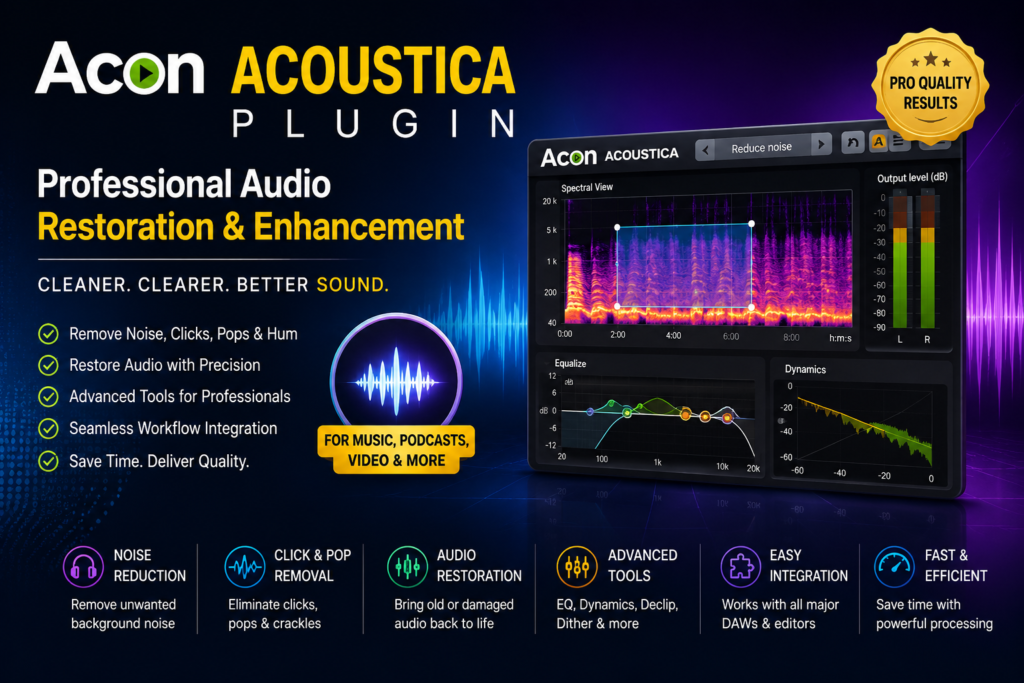
In essence, Acon Acoustica Plugin is a professional audio restoration and enhancement solution designed to improve sound quality with powerful yet easy-to-use tools. From removing background noise to restoring damaged recordings, the plugin helps editors achieve clear and polished audio without spending hours on manual corrections.
In this guide, therefore, you’ll learn what the Acon Acoustica Plugin is, its key features, practical applications, advantages, and why it has become a trusted choice for audio and video professionals.
What Is Acon Acoustica Plugin?
To begin with, Acon Acoustica Plugin is a professional audio processing and restoration plugin developed by Acon Digital. Specifically, it offers a collection of tools that clean, repair, and enhance audio recordings while maintaining natural sound quality.
Unlike basic audio effects, however, the plugin uses intelligent processing algorithms to remove unwanted noise, reduce distortion, and improve overall clarity. As a result, editors can produce broadcast-quality audio with minimal effort.
Why Use Acon Acoustica Plugin?
Admittedly, poor audio quality can reduce viewer engagement, even if the video itself looks excellent. Fortunately, though, Acon Acoustica Plugin solves many common audio problems quickly and efficiently.
Overall, some of the biggest reasons professionals use the plugin include:
- Professional audio restoration
- High-quality noise reduction
- Easy-to-use interface
- Fast processing speed
- Broadcast-quality results
- Compatibility with popular editing software
Moreover, it simplifies complex audio repair tasks that would otherwise require multiple plugins.
Key Features of Acon Acoustica Plugin
Advanced Noise Reduction
To start, background noise is one of the most common issues in audio recordings.
Specifically, the plugin can effectively reduce:
- Fan noise
- Air conditioner sounds
- Wind noise
- Room ambience
- Electrical hum
- Constant background hiss
Consequently, voices become much clearer and easier to understand.
Audio Restoration Tools
In addition, older recordings often contain unwanted artifacts.
To address this, Acon Acoustica Plugin includes restoration tools for:
- Click removal
- Crackle reduction
- Pop removal
- Hum elimination
- Clipping repair
Therefore, damaged recordings can often be restored without noticeable quality loss.
Professional Equalizer
Beyond restoration, a built-in equalizer allows editors to shape audio frequencies precisely.
Specifically, features include:
- Parametric EQ
- High-pass filters
- Low-pass filters
- Frequency balancing
- Vocal enhancement
As a result, voices sound cleaner and more natural.
Dynamic Processing
Similarly, maintaining consistent audio levels is essential for professional production.
To achieve this, the plugin includes tools such as:
- Compressor
- Limiter
- Expander
- Gate
Together, these processors help create balanced audio that remains comfortable to listen to.
Reverb and Spatial Effects
In addition to restoration tools, Acon Acoustica Plugin also offers professional reverb effects.
For instance, editors can create:
- Natural room ambience
- Studio reverb
- Hall simulations
- Plate reverbs
Furthermore, adjustable controls allow precise customization for different projects.
Real-Time Audio Processing
Notably, the plugin processes audio in real time, allowing editors to hear changes instantly.
Accordingly, benefits include:
- Faster editing
- Immediate feedback
- Accurate adjustments
- Improved workflow efficiency
Therefore, editors spend less time waiting and more time creating.
Common Uses of Acon Acoustica Plugin
Podcast Production
To illustrate, podcasters often record in less-than-perfect environments.
In response, the plugin helps by:
- Removing background noise
- Improving voice clarity
- Balancing audio levels
- Reducing echo
As a result, podcast episodes sound much more professional.
Video Production
Likewise, video editors frequently use the plugin to enhance dialogue recorded on location.
Specifically, typical improvements include:
- Dialogue cleanup
- Noise removal
- Volume balancing
- Audio restoration
Consequently, viewers enjoy a much better listening experience.
Music Production
In much the same way, musicians and producers use Acon Acoustica Plugin for:
- Vocal enhancement
- Audio repair
- Mixing support
- Mastering preparation
Additionally, the plugin helps preserve the natural character of recordings.
Film and Documentary Editing
Similarly, film editors often work with location recordings containing background noise.
Specifically, the plugin improves:
- Interview audio
- Voice-over recordings
- Environmental sound
- Documentary narration
Therefore, productions maintain professional audio quality throughout.
Compatible Software
Above all, one of the biggest advantages of Acon Acoustica Plugin is its wide compatibility.
Indeed, it works with many popular editing applications, including:
- EDIUS
- Adobe Premiere Pro
- Adobe Audition
- DaVinci Resolve
- VEGAS Pro
- Cubase
- Nuendo
- Reaper
- Studio One
- Audacity (with supported plugin formats)
As a result, editors can integrate it into almost any professional workflow.
Performance and System Efficiency
Meanwhile, Acon Acoustica Plugin is optimized for both performance and stability.
Specifically, performance benefits include:
- Fast audio processing
- Low CPU usage
- Stable operation
- Real-time previews
- Efficient memory management
Consequently, even large projects remain responsive during editing.
Acon Acoustica Plugin vs Standard Audio Effects
| Feature | Acon Acoustica Plugin | Basic Audio Effects |
|---|---|---|
| Noise Reduction | Advanced | Basic |
| Audio Restoration | Professional | Limited |
| Voice Enhancement | Excellent | Average |
| Real-Time Processing | Yes | Limited |
| Restoration Accuracy | High | Moderate |
| Professional Workflow | Excellent | Basic |
Clearly, then, Acon Acoustica Plugin offers more powerful tools for professional audio editing.
Benefits of Using Acon Acoustica Plugin
Overall, using the plugin provides several important advantages:
- Improves overall audio quality
- Removes unwanted background noise
- Restores damaged recordings
- Speeds up post-production
- Produces broadcast-quality sound
- Enhances dialogue clarity
- Supports professional workflows
Moreover, it reduces the amount of manual audio repair required during editing.
Tips for Getting the Best Results
To maximize audio quality when using Acon Acoustica Plugin, consider the following:
- First, record clean audio whenever possible.
- Then, apply noise reduction conservatively.
- Next, use equalization to enhance voice clarity.
- Also, monitor audio through quality headphones.
- Furthermore, preview every adjustment before exporting.
- In addition, save custom presets for recurring projects.
- Finally, keep your plugin updated for the latest improvements.
Additionally, combining multiple restoration tools often delivers the best overall results.
Who Should Use Acon Acoustica Plugin?
Overall, the plugin is ideal for:
- Video editors
- Podcast creators
- YouTubers
- Music producers
- Documentary filmmakers
- Wedding videographers
- Broadcast professionals
- Audio engineers
- Corporate content creators
In short, whether you’re producing online content or broadcast media, the plugin provides professional audio enhancement tools for every workflow.
Frequently Asked Questions
What is Acon Acoustica Plugin used for?
Essentially, it is used to restore, clean, and enhance audio recordings by removing noise, repairing damaged sound, and improving overall audio quality.
Is Acon Acoustica Plugin beginner-friendly?
Yes. Overall, the interface is straightforward, making it suitable for beginners while still offering advanced controls for professionals.
Can Acon Acoustica Plugin remove background noise?
Yes. In fact, it effectively reduces background noise such as fan sounds, hum, hiss, wind, and room ambience.
Is Acon Acoustica Plugin suitable for professional work?
Absolutely. Indeed, it is widely used in podcast production, filmmaking, broadcasting, music production, and commercial audio editing.
Does Acon Acoustica Plugin support real-time editing?
Yes. Specifically, real-time processing allows you to hear adjustments instantly while editing.
Final Thoughts
Ultimately, Acon Acoustica Plugin is an excellent solution for anyone who wants cleaner, clearer, and more professional audio. In addition to providing advanced noise reduction and restoration tools, it also offers high-quality equalization, dynamic processing, and real-time performance within an intuitive interface.
Whether you’re editing YouTube videos, podcasts, documentaries, wedding films, or music projects, therefore, Acon Acoustica Plugin can dramatically improve your audio quality while reducing editing time. Ultimately, if professional sound matters to your productions, this plugin is a valuable investment that can elevate every project.