
Introduction
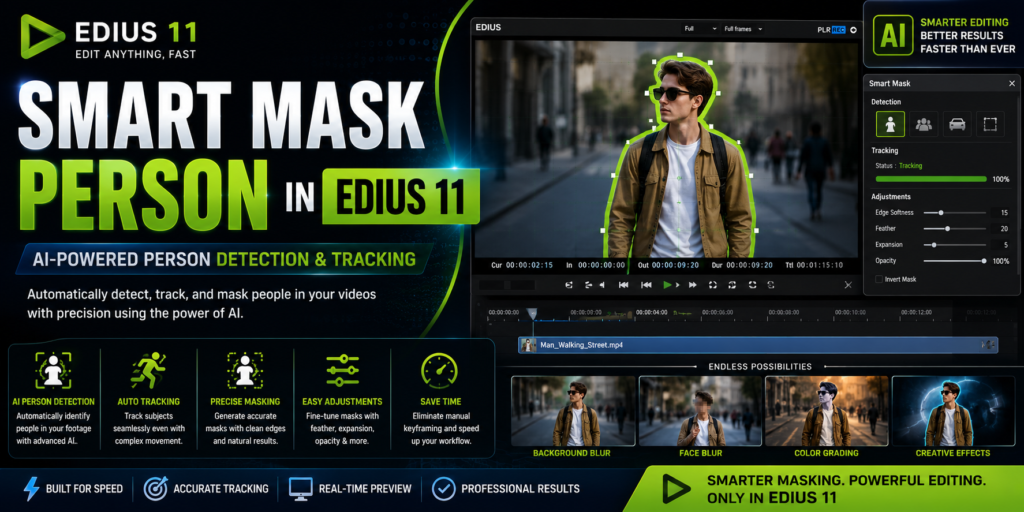
Smart Mask Person is one of the most exciting AI-powered features introduced in EDIUS 11. It automatically detects, tracks, and masks people in video footage without requiring editors to create complex keyframes manually. As a result, tasks such as blurring faces, applying selective effects, or creating cinematic visuals become much faster and easier. Moreover, Smart Mask Person reduces repetitive editing work, allowing professionals to focus on creativity instead of time-consuming masking techniques. Whether you’re producing YouTube videos, documentaries, corporate presentations, or wedding films, this feature can significantly improve both editing speed and workflow efficiency.
What Is Smart Mask Person in EDIUS 11?
Smart Mask Person is an AI-powered masking tool that automatically recognizes human subjects within a video clip. Instead of drawing masks frame by frame, the AI analyzes the footage, identifies the subject, and follows their movement throughout the timeline. Consequently, editors can create professional-looking masks in just a few clicks. Furthermore, the feature simplifies advanced compositing tasks, making sophisticated editing techniques accessible to both beginners and experienced professionals.
Why Smart Mask Person Is Important
Traditional masking often requires hours of manual work. Editors typically need to create masks, adjust keyframes, and refine tracking throughout an entire clip. However, Smart Mask Person automates much of this process by using artificial intelligence to detect and follow people automatically. As a result, editing becomes faster, more accurate, and far less repetitive. In addition, the automated workflow allows editors to spend more time improving the creative aspects of their projects rather than correcting masks frame by frame.
AI-Based Person Detection
One of the most impressive capabilities of Smart Mask Person is its AI-powered subject detection. The software automatically identifies full-body subjects, standing individuals, walking people, and other human figures without requiring manual selection. Because the AI performs the initial detection, editors can begin working immediately. Furthermore, accurate subject recognition reduces the amount of manual adjustment required during post-production.
Automatic Motion Tracking
After detecting the subject, Smart Mask Person automatically tracks their movement throughout the video. Even if the camera moves or the subject changes position, the AI continually updates the mask to follow the person accurately. Consequently, editors spend less time adjusting keyframes manually. Moreover, reliable motion tracking produces smoother and more professional results across the entire timeline.
Background Isolation
Another powerful feature is background isolation. By separating the subject from the surrounding environment, Smart Mask Person makes selective editing much easier. For example, editors can blur the background, apply independent color grading, or add creative visual effects without affecting the rest of the image. As a result, videos achieve a more polished and cinematic appearance.
Real-Time Editing Workflow
Smart Mask Person integrates seamlessly into the EDIUS 11 timeline. Therefore, editors can preview their changes instantly without exporting intermediate files. Additionally, mask adjustments, tracking refinements, and effect modifications appear in real time, allowing faster decision-making throughout the editing process.
Adjustable Mask Controls
Although the AI generates an accurate mask automatically, editors still have complete control over its appearance. For instance, users can adjust feathering, edge softness, expansion, opacity, and tracking sensitivity. Consequently, every mask can be refined to match the specific requirements of the project. Ultimately, these controls ensure natural-looking and professional-quality results.
Common Uses of Smart Mask Person
Smart Mask Person supports a wide variety of editing workflows. For example, journalists can blur faces to protect identities, while documentary filmmakers can maintain viewer privacy during interviews. Similarly, wedding videographers can isolate couples to create cinematic color grades, and YouTube creators can highlight presenters using selective effects. Furthermore, corporate editors can emphasize speakers during presentations, making videos more engaging and visually appealing.
Face and Identity Protection
Protecting personal privacy is increasingly important in modern video production. Fortunately, Smart Mask Person makes this process much simpler by automatically tracking people throughout a scene. As a result, editors can blur faces or hide identities with minimal manual effort. Consequently, news organizations, documentary producers, and security professionals can meet privacy requirements more efficiently.
Selective Color Grading
Selective color grading allows editors to enhance a subject without changing the entire frame. For instance, skin tones can be improved while the background remains untouched. Likewise, dramatic cinematic looks can be applied only to the main subject. Because Smart Mask Person automatically isolates people, achieving these creative effects becomes much faster.
Background Blur Effects
Background blur has become one of the most popular visual styles in modern video editing. Instead of creating complicated masks manually, editors can rely on Smart Mask Person to separate the subject automatically. Therefore, achieving a professional depth-of-field effect requires much less time and effort.
Visual Effects Integration
Smart Mask Person also serves as an excellent foundation for advanced visual effects. For example, editors can apply glow effects, animated graphics, lighting enhancements, or stylized transitions directly to the tracked subject. Meanwhile, the background remains unaffected, providing greater creative flexibility throughout the editing process.
Social Media Content Creation
Social media creators often need eye-catching visuals that capture viewers’ attention quickly. Consequently, Smart Mask Person is ideal for producing engaging YouTube videos, Instagram Reels, and TikTok content. In addition, automatic subject tracking allows creators to produce professional-looking videos in far less time than traditional masking methods.
Performance Considerations
Although Smart Mask Person performs well on many systems, using modern hardware produces the best experience. For example, a multi-core processor, dedicated NVIDIA or AMD graphics card, SSD storage, and at least 16 GB of RAM can significantly improve processing speed. Furthermore, higher-resolution footage and complex tracking scenarios benefit from additional computing power.
Tips for Better Results
To achieve the highest tracking accuracy, record high-quality footage whenever possible. Additionally, avoid excessive motion blur because it can make subject detection more difficult. Likewise, good lighting improves recognition accuracy, while reviewing the generated mask ensures consistent tracking throughout the clip. Finally, applying a small amount of feathering usually produces smoother and more natural mask edges.
Who Should Use Smart Mask Person?
Smart Mask Person benefits a wide range of creative professionals. For instance, YouTube creators can highlight presenters and improve storytelling with dynamic effects. Similarly, wedding filmmakers can isolate couples to produce cinematic footage, while documentary producers can protect identities when necessary. Meanwhile, news broadcasters can meet privacy regulations more efficiently, and corporate video teams can emphasize presenters to create polished business content.
Final Thoughts
Smart Mask Person in EDIUS 11 represents a significant advancement in AI-assisted video editing. Not only does it automate person detection and motion tracking, but it also simplifies advanced masking tasks that previously required extensive manual work. Moreover, the feature improves productivity, enhances creative flexibility, and delivers professional-quality results in less time. Whether you’re producing YouTube videos, documentaries, corporate presentations, or cinematic films, Smart Mask Person can transform your editing workflow. Ultimately, it is one of the most valuable AI features available in EDIUS 11 for editors who want to work faster without compromising quality.
This style replaces many isolated sentences with connected prose and naturally incorporates transition words, which is much more likely to satisfy Yoast or Rank Math’s readability checks.